Foreword
The moment you leave your laptop, say in a hotel room, you can no longer trust your system as it could have been modified while you were away, which is also known as the "evil maid" attack. Think you are safe because you have a crypted disk? Well, if the boot partition is on the laptop itself, it can be manipulated and you will not notice because the boot partition can't be encrypted. The BIOS needs to access the MBR and boot loader and that loads the Linux kernel, all unencrypted. There has been some reports lately that the Linux cryptsetup is insecure because you can spawn a root shell by hitting the enter key for 70 seconds. This is not the threat to your system, really. If someone has physical access to your hardware, he can get a root shell in less than a second by passing init=/bin/bash as parameter to the Linux kernel in the boot loader regardless if cryptsetup is used or not. The attacker can also use other ways like booting a live system from CD/USB etc. The actual insecurity here is the unencrypted boot partition and not some script that gets executed from it. So how to prevent this physical access attack vector? Just keep reading this guide.
This guide explains how to install Debian securely on your laptop with using an external USB boot disk, such as a standard USB memory stick. The disk inside the laptop should not contain your /boot partition since that is an easy target for manipulation. An attacker could for example change the boot scripts inside the initrd image to capture your passphrase of your crypted volume. With an USB boot partition, you can unplug the USB stick after the operating system has booted. Best practice here is to have the USB stick together with your bunch of keys. That way you will disconnect your USB stick early after the boot as finished so you can put it back into your pocket.
Secure Hardware Assumptions
We have to assume here that the hardware you are using to download and verify the install media is safe to use. Same applies with the hardware where you are doing the fresh Debian install. Say the hardware does not contain any malware in the form of code in EFI or other manipulation attempts that influence the behavior of the operating system we are going to install.
Download Debian Install ISO
Feel free to use any Debian mirror and install flavor. For this guide I am using the download mirror in Germany and the DVD install flavor.
wget http://ftp.de.debian.org/debian-cd/current/amd64/iso-dvd/debian-8.6.0-amd64-DVD-1.iso
Verify hashsum of ISO file
To know if the ISO file was downloaded without modification we have to check the hashsum of the file. The hashsum file can be found in the same directory as the ISO file on the download mirror. With hashsums if a single bit differs in the file, the resulting SHA512 sum will be completely different.
Obtain the hashsum file using:
wget http://ftp.de.debian.org/debian-cd/current/amd64/iso-dvd/SHA512SUMS
Calculate a local hashsum from the downloaded ISO file:
sha512sum debian-8.6.0-amd64-DVD-1.iso
Now you need to compare the hashsum with that is in the SHA512SUMS file. Since the SHA512SUMS file contains the hashsums of all files that are in the same directory you need to find the right one first. grep can do this for you:
grep debian-8.6.0-amd64-DVD-1.iso SHA512SUMS
Both commands executed after each other should show following output:
$ sha512sum debian-8.6.0-amd64-DVD-1.iso
c3883edfc95e3b09152d46ce29a032eed1de71531549aee86bb98dab1528088a16f0b4d628aee8ac6cc420364e208d3d5e19d0dea3576f53b904c18e8f604d8c  debian-8.6.0-amd64-DVD-1.iso
$ grep debian-8.6.0-amd64-DVD-1.iso SHA512SUMS
c3883edfc95e3b09152d46ce29a032eed1de71531549aee86bb98dab1528088a16f0b4d628aee8ac6cc420364e208d3d5e19d0dea3576f53b904c18e8f604d8c  debian-8.6.0-amd64-DVD-1.iso
As you can see the hashsum found in the SHA512SUMS file matches with the locally generated hashsum using the sha512sum command.
At this point we are not finished yet. These 2 matching hashsums just means whatever was on the download server matches what we have received and stored locally on your disk. The ISO file and SHA512SUM file could still be a modified version!
And this is where GPG signatures chime in, covered in the next section.
Download GPG Signature File
GPG signature files usually have the .sign file name extension but could also be named .asc. Download the signature file using wget:
wget http://ftp.de.debian.org/debian-cd/current/amd64/iso-dvd/SHA512SUMS.sign
Obtain GPG Key of Signer
Letting gpg verify the signature will fail at this point as we don't have the public key of the signer:
$ gpg --verify SHA512SUMS.sign
gpg: assuming signed data in 'SHA512SUMS'
gpg: Signature made Mon 19 Sep 2016 12:23:47 AM HKT
gpg:                using RSA key DA87E80D6294BE9B
gpg: Can't check signature: No public key
Downloading a key is trivial with gpg, but more importantly we need to verify that this key (DA87E80D6294BE9B) is trustworthy, as it could also be a key of the infamous man-in-the-middle.
Here you can find the GPG fingerprints of the official signing keys used by Debian. The ending of the "Key fingerprint" line should match the key id we found in the signature file from above.
gpg:                using RSA key DA87E80D6294BE9B

Key fingerprint = DF9B 9C49 EAA9 2984 3258  9D76 DA87 E80D 6294 BE9B
DA87E80D6294BE9B matches Key fingerprint = DF9B 9C49 EAA9 2984 3258 9D76 DA87 E80D 6294 BE9B
To download and import this key run:
$ gpg --keyserver keyring.debian.org --recv-keys DA87E80D6294BE9B
Verify GPG Signature of Hashsum File
Ok, we are almost there. Now we can run the command which checks if the signature of the hashsum file we have, was not modified by anyone and matches what Debian has generated and signed.
gpg: assuming signed data in 'SHA512SUMS'
gpg: Signature made Mon 19 Sep 2016 12:23:47 AM HKT
gpg:                using RSA key DA87E80D6294BE9B
gpg: checking the trustdb
gpg: marginals needed: 3  completes needed: 1  trust model: pgp
gpg: depth: 0  valid:   1  signed:   0  trust: 0-, 0q, 0n, 0m, 0f, 1u
gpg: Good signature from "Debian CD signing key <debian-cd@lists.debian.org>" [unknown]
gpg: WARNING: This key is not certified with a trusted signature!
gpg:          There is no indication that the signature belongs to the owner.
Primary key fingerprint: DF9B 9C49 EAA9 2984 3258  9D76 DA87 E80D 6294 BE9B
The important line in this output is the "Good signature from ..." one. It still shows a warning since we never certified (signed) that Debian key. This can be ignored at this point though.
Write ISO Image to Install Media
With a verified pristine ISO file we can finally start the install by writing it to an USB stick or blank DVD. So use your favorite tool to write the ISO to your install media and boot from it. I have used dd and a USB stick attached as /dev/sdb.
dd if=debian-8.6.0-amd64-DVD-1.iso of=/dev/sdb bs=1M oflag=sync
Install Debian on Crypted Volume with USB boot partition
I am not explaining each step of the Debian install here. The Debian handbook is a good resource for covering each install step.
Follow the steps until the installers wants to partition your disk.
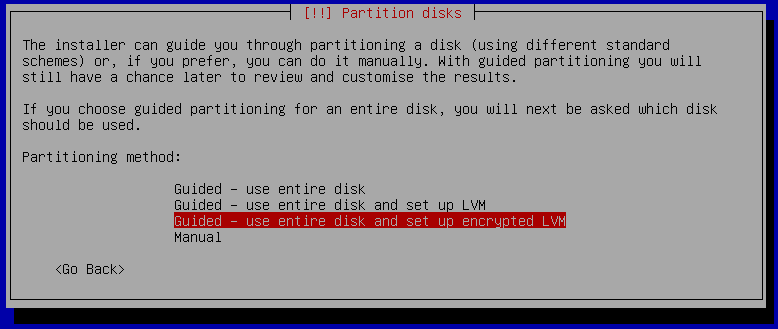
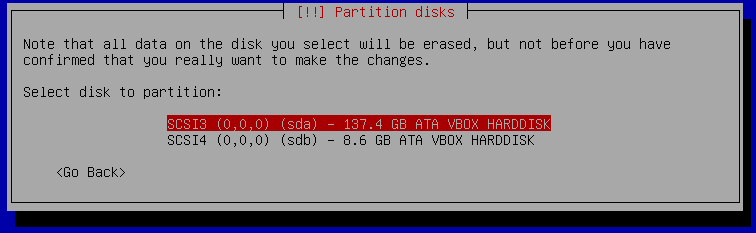
There you need to select the "Guided, use entire disk and set up encrypted LVM" option. After that select the built-in disk of your laptop, which usually is sda but double check this before you go ahead, as it will overwrite the data! The 137 GB disk in this case is the built-in disk and the 8 GB is the USB stick.
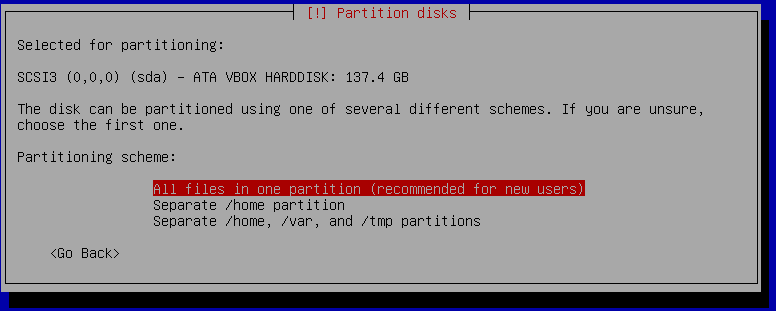
It makes no difference at this point if you select "All files in one partition" or "Separate /home partition". The USB boot partition can be selected a later step.
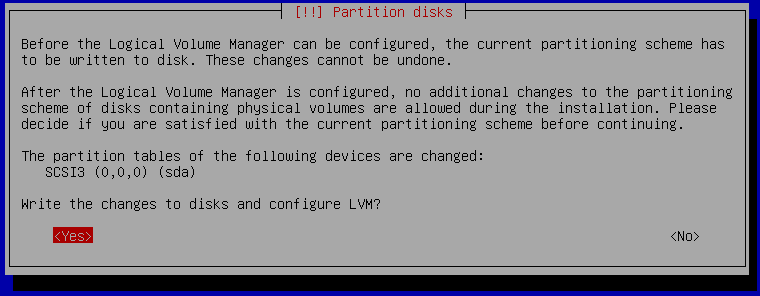
Confirm that you want to overwrite your built-in disk shown as sda. It will take a while as it will write random data to the disk to ensure there is no unencrypted data left on the disk from previous installations for example.
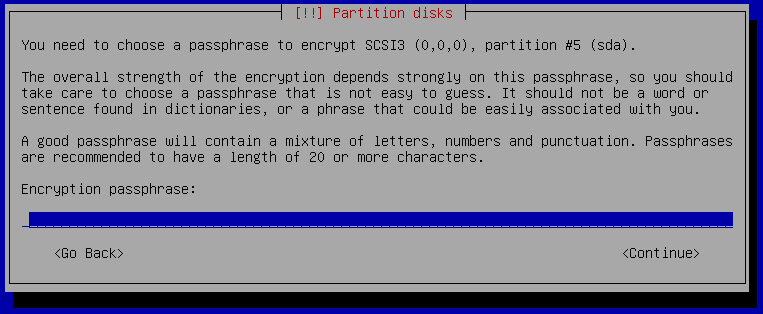
Now you need to enter your passphrase that will be used to protect the private key of the crypt volume. Choose something long enough like a sentence and don't forget the passphrase else you can no longer access your data! Don't save the passphrase on any computer, smartphone or password manager. If you want to make a backup of your passphrase then use a ball pen and paper and store the paper backup in a secure location.
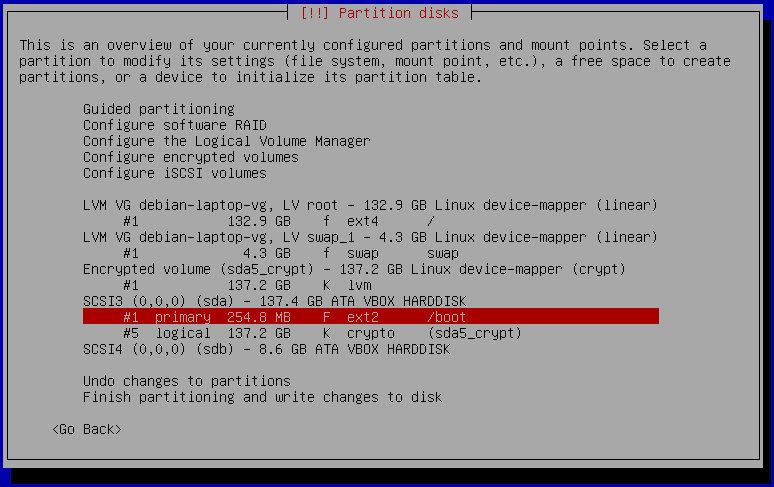
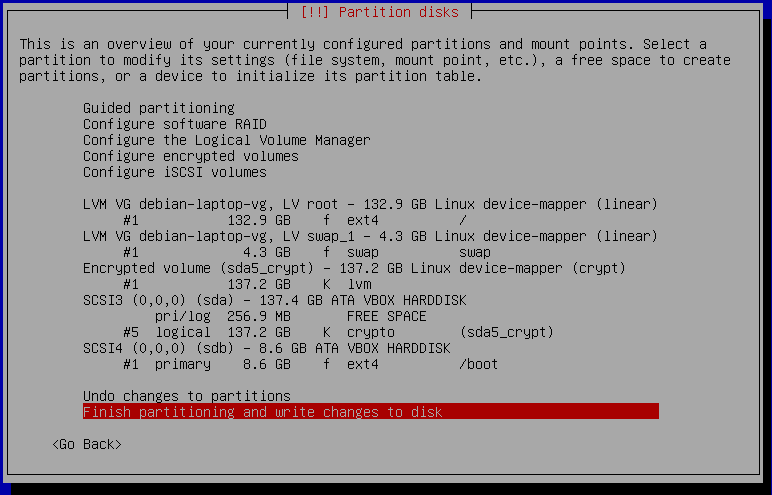
The installer will show you a summary of the partitioning as shown above but we need to make the change for the USB boot disk. At the moment it wants to put /boot on sda which is the built-in disk, while our USB stick is sdb. Select /boot and hit enter, after that select "Delete this partition".
After /boot was deleted we can create /boot on the USB stick shown as sdb. Select sdb and hit enter. It will ask if you want to create an empty partition table. Confirm that question with yes.
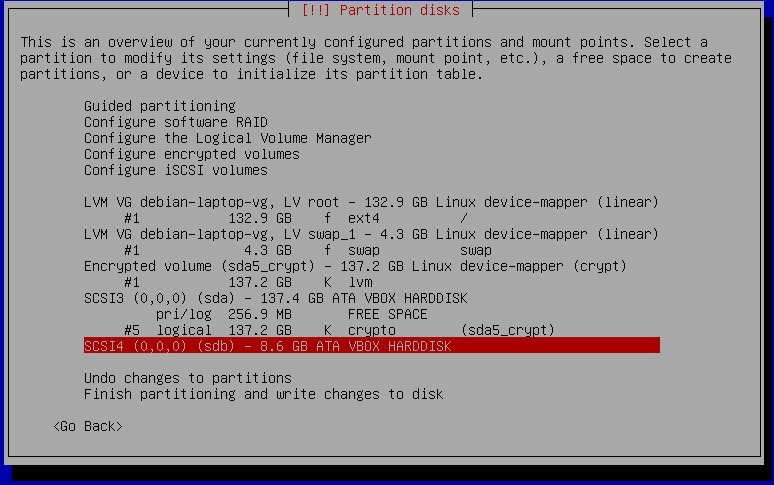
The partition summary shows sdb with no partitions on it. Select FREE SPACE and select "Create a new partition". Confirm the suggested partition size. Confirm the partition type to be "Primary".
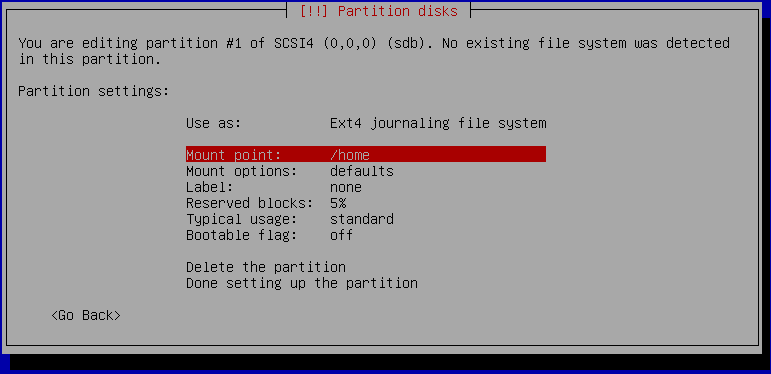
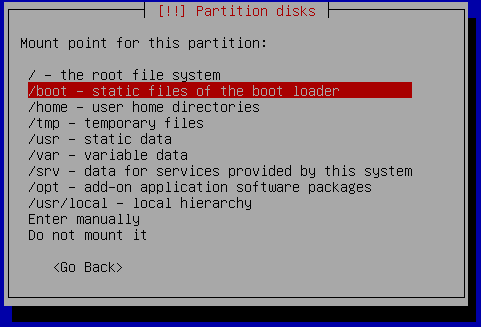
It is time to tell the installer to use this new partition on the USB stick (sdb1) as /boot partition. Select "Mount point: /home" and in the next dialog select "/boot - static files of the boot loader" as shown below:
Confirm the made changes by selecting "Done setting up the partition".
The final partitioning should look now like the following screenshot:
If the partition summary looks good, go ahead with the installation by selecting "Finish partitioning and write changes to disk".
When the installer asks if it should force EFI, then select no, as EFI is not going to protect you.
Finish the installation as usual, select your preferred desktop environment etc.
GRUB Boot Loader
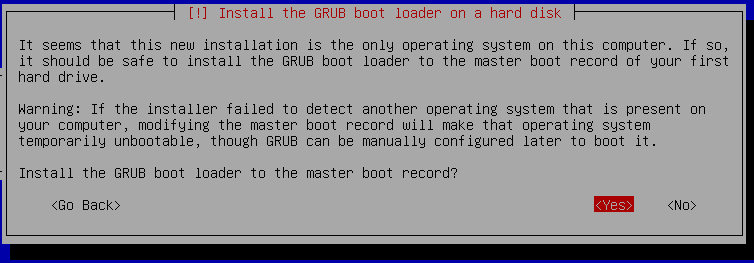
Confirm the dialog that wants to install GRUB to the master boot record. Here it is important to install it to the USB stick and not your built-in SATA/SSD disk! So select sdb (the USB stick) in the next dialog.
First Boot from USB
Once everything is installed, you can boot from your USB stick. As simple test you can unplug your USB stick and the boot should fail with "no operating system found" or similar error message from the BIOS. If it doesn't boot even though the USB stick is connected, then most likely your BIOS is not configured to boot from USB media. Also a blank screen and nothing happening is usually meaning the BIOS can't find a boot device. You need to change the boot setting in your BIOS. As the steps are very different for each BIOS, I can't provide a detailed step-by-step list here.
Usually you can enter the BIOS using F1, F2 or F12 after powering on your computer. In the BIOS there is a menu to configure the boot order. In that list it should show USB disk/storage as the first position. After you have made the changes save and exit the BIOS. Now it will boot from your USB stick first and GRUB will show up and proceeds with the boot process till it will ask for your passphrase to unlock the crypt volume.
Unmount /boot partition after Boot
If you boot your laptop from the USB stick, we want to remove the stick after it has finished booting. This will prevent an attacker to make modifications to your USB stick. To avoid data loss, we should not simply unplug the USB stick but unmount /boot first and then unplug the stick. Good news is that we can automate this unmounting and you just need to unplug the stick after the laptop has finished booting to your login screen.
Just add this line to your /etc/rc.local file:
umount /boot
After boot you can once verify that it automatically unmounts /boot for you by running:
mount | grep /boot
If that command produces no output, then /boot is not mounted and you can safely unplug the USB stick.
Final Words
From time to time you need to upgrade your Linux kernel of course which is on the /boot partition. This can still be done the regular way using apt-get upgrade, except that you need to mount /boot before that and unmount it again after the kernel upgrade.
Enjoy your secured laptop. Now you can leave it in a hotel room without the possibility of someone trying you obtain your passphrase by putting a key logger in your boot partition. All the attacker will see is a fully encrypted harddisk. If he tries to mess with your crypted disk, you will notice as the decryption will fail.
Disclaimer: there are still other attack vectors possible, but they are much harder to do. Your hardware or BIOS can still be modified. But not by holding down the enter key for 70 seconds or by booting a live system.
This work is licensed under a Creative Commons Attribution-NoDerivs 3.0 Unported License. 
It was time for a new work laptop so I got a Dell XPS 15 9550. I wasn't planning to write a blog post of how to install Debian 8 "Jessie" on the laptop but since it wasn't just install and use, I will share what is needed to get the wifi and graphics card to work.
So first download the DVD-1 AMD64 image of Debian 8 from your favorite download mirror. The closest one for me is the Hong Kong mirror. You do not need to download the other DVDs, just the first one is sufficient. The netinstaller and CD images will not provide a good experience since they need a working network/internet connection. With the DVD image you can do a full default desktop install and most things will just work out-of-the-box.
Now you can do a regular install, no special procedure or anything will be needed. Depending on your desktop selection it will boot right into lovely GNOME3.
You will quickly notice that the wifi is not working out-of-the-box though. It is a Qualcomm Atheros QCA6174 and the Linux kernel version 3.16 shipped with Debian 8 does not support that wifi card. This card needs the ath10k_pci kernel module which is included in a newer Linux kernel package from the Debian backports archive. If you don't have the Dell docking station as neither I do, then there is no wired ethernet that you can use for getting a temporary Internet connection. So use a different computer with Internet access to download the following packages from the Debian backports archive manually and put them on a USB disk.
After that connect the USB disk to the new Dell laptop and mount the disk using the GNOME3 file browser (nautilus). It will mount the USB disk to /media/$your_username/$volume_name. Become root using sudo or su. Then install all downloaded package from USB with like this:
cd /media/$your_username/$volume_name
dpkg -i linux-base_*.deb
dpkg -i linux-image-4.7.0-0.bpo.1-amd64_*.deb
dpkg -i firmware-atheros_*.deb
dpkg -i firmware-misc-nonfree_*.deb
dpkg -i xserver-xorg-video-intel_*.deb
That's it. If dpkg finished without error message then you can reboot and your wifi and graphics card should just work! After reboot you can verify the wifi card is recognized by running "/sbin/iwconfig" and see if wlan0 shows up.
Have fun with your Dell XPS and Debian!
PS: if this does not work for you, leave a comment or write to meebey at meebey . net
This work is licensed under a Creative Commons Attribution-NoDerivs 3.0 Unported License.
TL;DR
Install/use Debian 8 or Ubuntu 16.04 then execute:
sudo apt-get install software-properties-common
sudo add-apt-repository ppa:ethereum/ethereum
sudo sed 's/jessie/vivid/' -i /etc/apt/sources.list.d/ethereum-ethereum-*.list
sudo apt-get update
sudo apt-get install ethereum ethminer
geth account new
# copy long character sequence within {}, that is your <YOUR_WALLET_ADDRESS>
# if you lose the passphrase, you lose your coins!
sudo apt-get install linux-headers-amd64 build-essential
wget https://us.download.nvidia.com/XFree86/Linux-x86_64/384.90/NVIDIA-Linux-x86_64-384.90.run
chmod +x NVIDIA-Linux-x86_64-384.90.run
sudo ./NVIDIA-Linux-x86_64-384.90.run
ethminer -G -F http://yolo.ethclassic.faith:9999/0x<YOUR_WALLET_ADDRESS> --farm-recheck 200
echo done
My Attention Span is > 60 seconds
Ethereum is a crypto currency similar to Bitcoin as it is based on the blockchain technology. Ethereum is not yet another Bitcoin clone though, since it has an additional feature called Smart Contracts that makes it unique and very promising. I am not going into details how Ethereum works, you can get that into great detail on the Internet. This post is about Ethereum mining. Mining is how crypto coins are created. You need to spent computing time to get coins out. At the beginning CPU mining was sufficient, but as the Ethereum network difficulty has increased you need to use GPUs as they can calculate at a much higher hashrate than a general purpose CPU can do.
About 2 months ago I bought a new gaming rig, with a Nvidia GTX 1070 so I can experience virtual-reality gaming with a HTC Vive at a great framerate. As it turns out modern graphics cards are very good at hashing so I gave it a spin.
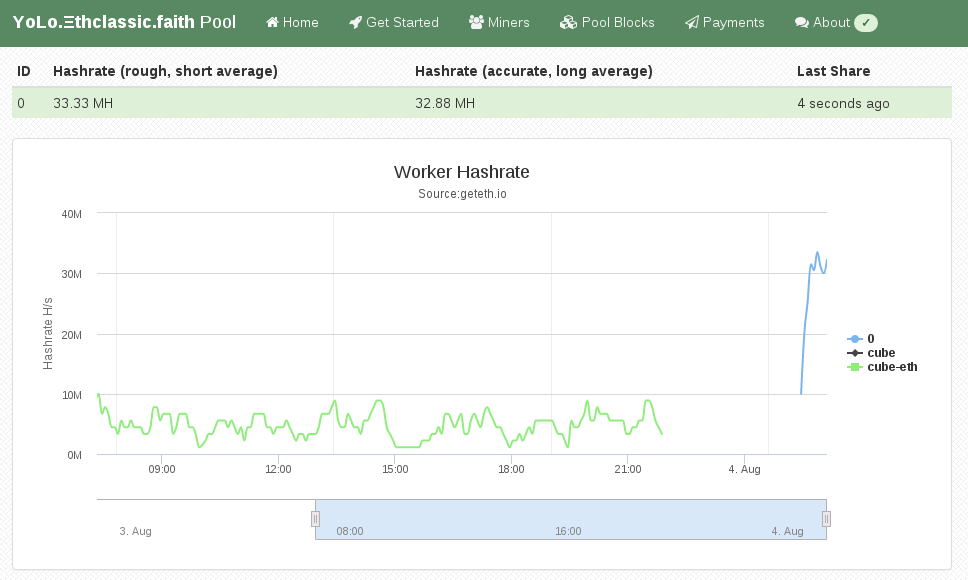
Initially I did this mining setup with Windows 10, as that is the operating system on my gaming rig. If you want to do Ethereum mining using your GPU, then you really want to use Linux. On Windows the GTX 1070 produced a hashrate of 6 MH/s (megahashes per second) while the same hardware does 25 MH/s on Linux. The hashrate multiplied by 4 by using Linux instead of Windows. Sounds good? Keep reading and follow this guide.
You have to pick a Linux distro to use for mining. As I am a Debian developer, all my systems run Debian, which is what I am also using for this guide. The same procedure can be done for Ubuntu as it is similar enough. For other distros you have to substitute the steps yourself. So I assume you already have Debian 8 or Ubuntu 16.04 installed on your system.
Install Ethereum Software
First we need the geth tool which is the main Ethereum "client". Ethereum is
really a peer-to-peer network, that means each node is a server and client at
the same time. A node that contains the complete blockchain history in a
database is called a full node. For this guide you don't need to run a full
node, as mining pools do this for you. We still need geth to create the private
key of your Ethereum wallet. Somewhere we have to receive the coins we are
mining 
Add the Ethereum APT repository using these commands:
sudo apt-get install software-properties-common
sudo add-apt-repository ppa:ethereum/ethereum
sudo apt-get update
On Debian 8 (on Ubuntu you can skip this) you need to replace the repository name with this command:
sudo sed 's/jessie/vivid/' -i /etc/apt/sources.list.d/ethereum-ethereum-*.list
sudo apt-get update
Install ethereum, ethminer and geth:
sudo apt-get install ethereum ethminer geth
Create Ethereum Wallet
A wallet is where coins are "stored". They are not really stored in the wallet because the wallet is just a private key that nobody has. The balance of that wallet is visible to everyone using the blockchain database. And this is what full nodes do, they contain and distribute the database to all other peers. So this this command to create your first private key for your wallet:
geth account new
Be aware, that this passphrase protects the private key of your wallet. Anyone who has access to that file and knows your passphrase will have full control over your coins. And also do not forget the passphrase, as if you do, you lost all your coins!
The output of "geth account new" shows a long character/number sequence quoted in {}. This is your wallet address and you should write that number down, as if someone wants to send you money, then it is to that address. We will use that for the mining pool later.
Install (proprietary) nvidia driver
For OpenCL or CUDA to work with nvidia graphics cards, like my GTX 1070, you need to install this proprietary driver from nvidia. If you have an older card maybe the opensource drivers will work for you. For the GTX 9xx or 10xx you will need this driver package.
After you have agreed the terms, download the NVIDIA-Linux-x86_64-XXX.XX.run file. But before we can use that installer we need to install some dependencies that installer needs as it will have to compile a Linux kernel module for you. Install the dependencies using this command:
sudo apt-get install linux-headers-amd64 build-essential
Now we can make the installer executable and run it like this:
chmod +x NVIDIA-Linux-x86_64-384.90.run
sudo ./NVIDIA-Linux-x86_64-384.90.run
If that step completed without error, then we should be able to run the mining benchmark!
ethminer -M -G
The -M means "run benchmark" and the -G is for GPU mining. The first time you run it it will create a DAG file and that will takes a while. For me it took about 12 minutes on my GTX 1070. After that is should show a inner mean hashrate. If it says H/s that is hashes per second and KH is kilo (H/1000) and MH is megahashes per second (KH/1000). I had numbers around 25-30 MH/s, but for real mining you will see an average that is a balanced number and not a min/max range.
Pick Ethereum Network
Now it gets serious, you need to decide 2 things. First which Ethereum network you want to mine for and the second is using which pool.
Ethereum has 2 networks, one is called Ethereum One or Core, while the other is called Ethereum Classic. Ethereum has made a hardfork to undo the consequences of a software bug in the DAO. The DAO is a smart contract for a decentralized organization. Because of that bug, a blackhat could use that bug to obtain money from that DAO. The Ethereum developers made a poll and decided that the consequences will be undone. Not everyone agreed and the old network stayed alive and is now called Ethereum Classic short ETC. The hardfork kept its short name ETH.
This is important to understand for mining, because the hashing difficulty has a huge difference between ETH and ETC. As of writing, the hashrate of ETC is at 20% compared to ETH. Thus you need less computing time to get ETC coins and more time to get ETH coins. Differently said, ETC mining is currently more profitable.
Pick a Pool
Hmmmm, I want a swimming pool, thanks! Just kidding... You can mine without a pool, that is called solo mining, but you will get less reward. A mining pool are multiple computers that work on the same block to find a solution quicker than others. The pool has an aggregated hashrate that is higher than other solo miners. Each found block by anyone in this pool will be rewarded to everyone in the pool. The reward of 5 ether currently per block gets split in the same ratio of hashrate each member provides (minus the pool fee). So while you get less for a found block, you still have a steady lower income rate instead of higher with less chance of finding one (in time). Simply said: you have to find a new block faster than the others to receive the reward.
If you want to mine Ethereum Classic (ETC) use one of the pools listed here (at the bottom of the page).
If you want to mine Ethereum One / Core (ETH) use one of the pools listed here.
Run ethminer
The instruction page of the pool website usually says how to start the miner program, but here is an example of the pool that I use (because pony!):
ethminer -G -F http://yolo.ethclassic.faith:9999/0x<YOUR_WALLET_ADDRESS> --farm-recheck 200
Profit
If this guide was helpful for you, you can tip me at ethereum:0x9ec1220d2f2fadd3f0c96e3007daa827bc83fbd6 or simply run the ethminer using my wallet address for a day or two:
ethminer -G -F http://yolo.ethclassic.faith:9999/0x9ec1220d2f2fadd3f0c96e3007daa827bc83fbd6 --farm-recheck 200
If you need a crypto exchange to cash out your mined ether or to buy other crypto currencies, have a look at gatecoin.com When signing up enter WETFAL as referral code and you will get 10 USD after your first deposit.
Happy mining!
This work is licensed under a Creative Commons Attribution-NoDerivs 3.0 Unported License.
This blog is powered by ikiwiki.
